 Gasp
GaspMath
You write math in Gasp with LaTeX, the standard way of typing equations. Gasp shows each equation as finished math while you type. In the file, the equation stays as plain LaTeX between dollar signs. That means any other Markdown app can read it too.
Notes full of equations
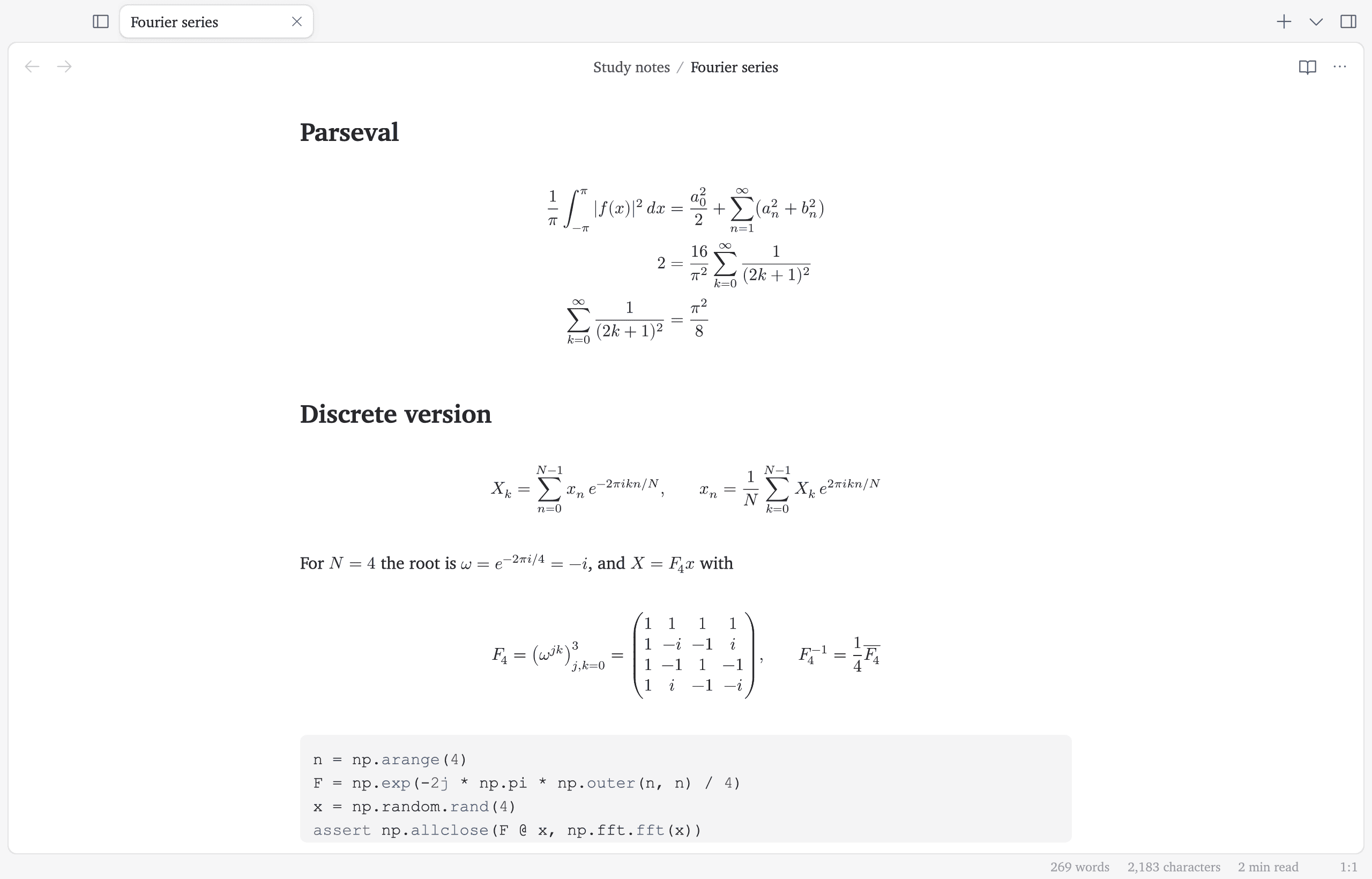
Shortcuts for typing math
| You type | Gasp writes | What it's for |
|---|---|---|
mk | $ $ | Starts math inside a sentence. |
dm | $$ $$ | Starts math on its own lines. |
// | \frac{ }{ } | Makes an empty fraction. |
x/ | \frac{x}{ } | Makes a fraction with x on top. |
@a | \alpha | Types the Greek letter alpha. @b is beta, and so on. |
beg | \begin{ } … \end{ } | Starts a block, such as a matrix. You type its name once. |
reals | \mathbb{R} | Types the symbol for the real numbers. |
While you type
- Each equation shows as finished math. When you click into it, you see the LaTeX again so you can edit it.
- While you edit an equation, a preview of the finished math sits just above the line.
- Each pair of matching brackets has its own color, so you can see which brackets belong together.
- Brackets around a sum, an integral or a fraction grow to fit what's inside them.
- The Tab key jumps past the next closing bracket. At the end of the math, it jumps out of the math.
- Inside a matrix, the Tab key moves to the next column and the Enter key starts the next row.
Sharing it
You can save any note as a PDF. The equations come out as cleanly as in a printed textbook. Footnotes sit at the bottom of each page. You can also save a note as a web page. Every modern web browser shows its equations without any extra software.
Questions
Does Gasp support LaTeX math?
Yes. Put math inside a sentence between single dollar signs, like $x^2$. Put math on its own lines between double dollar signs. This works the same way as in Obsidian. Gasp shows each equation as finished math. When you click into an equation, Gasp shows its LaTeX again.
Does Gasp have Latex Suite's snippets?
Yes. Gasp's built-in math shortcuts are the same as Latex Suite's. For example, mk starts math inside a sentence, and // makes a fraction.
Can I export math notes to PDF?
Yes. Gasp saves the note as a PDF with its equations and footnotes laid out like a printed page.